
As someone who’s been involved in technology for over 20 years, I tend to collect computers. This has unfortunately led to me having more computers than anyone can reasonably use. Being a stones throw from a large public university doesn’t help, as surplus auctions, dumpster dives, and thrift-store finds can be pretty fruitful. About 4 years ago I was looking for something to do with all the surplus hardware I had collected, so I decided to create a homelab.
So what is a homelab? A homelab is a personal computing environment designed for testing, experimenting, and learning about various technologies and software applications. It typically consists of hardware such as servers, networking equipment, and storage devices, as well as virtualization software to create multiple virtual machines for testing and development purposes. A homelab allows anyone to gain hands-on experience with different technologies in a non-production environment.
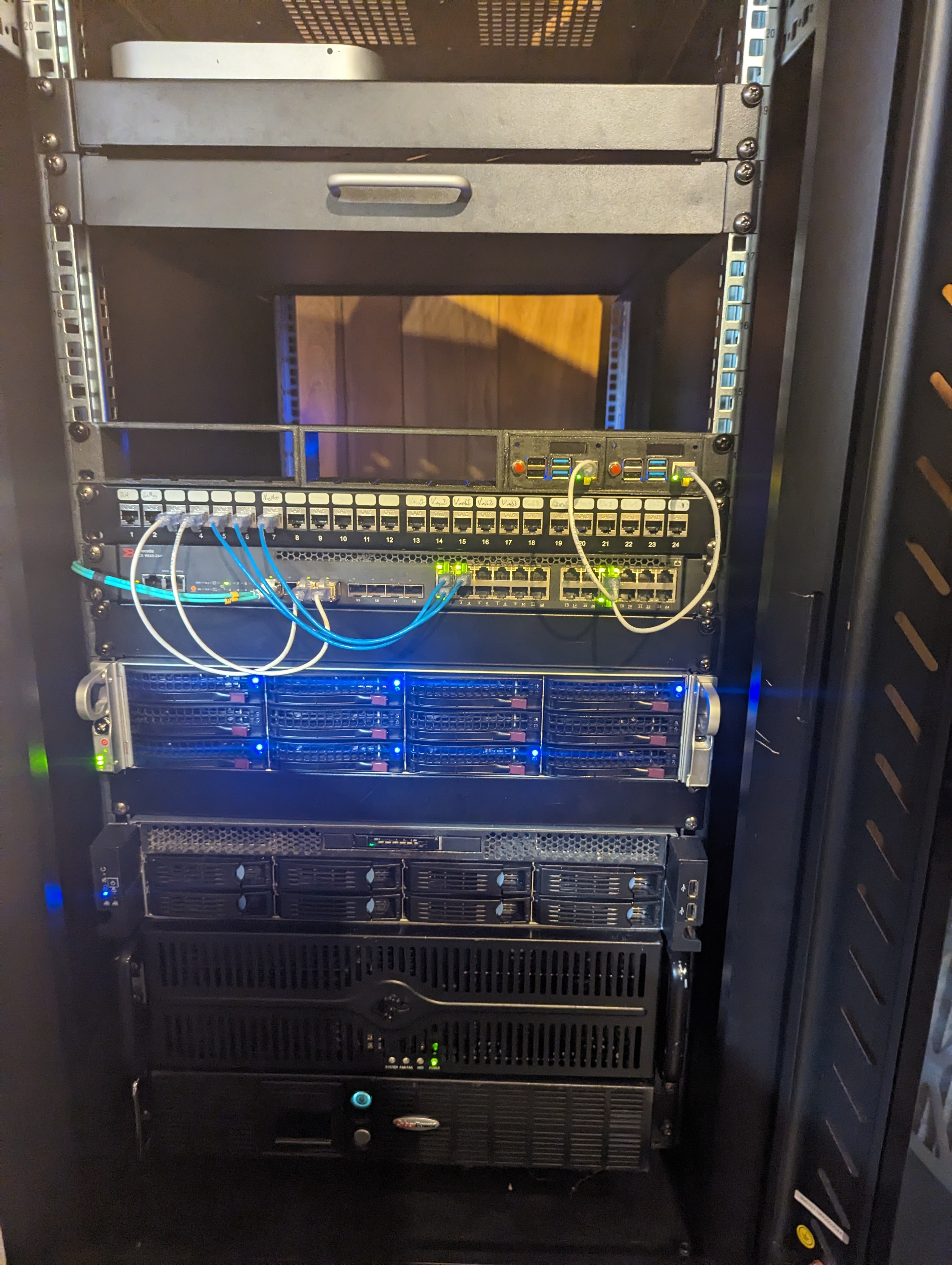
Over the last couple of years I’ve modified, upgraded, and hacked my homelab into the state that it is in now. In this post I’ll go over the basic components that you need in order to set up your own homelab and go over some of the decisions I’ve made going forward.
Networking
In general for any homelab you’re going to need networking equipment. If you want to play around with any advanced networking features like VLANs, Link Aggregation, or advanced management, you’ll need a managed switch. While I have several switches in my house, the workhorse of my homelab is an old brocade icx6610-24p-e. This switch is a BEAST in more ways than one. It has 24x Gigabit POE ports, 8x SFP+ (10G capable) Ports and 4x QSFP+ Ports – 2 of which are 40Gbps ports and 2 are splitable to 4xSFP+ ports. That’s a lot of horsepower!
This switch also uses a lot of electrical power (probably about 100 to 200 watts if you’re using POE) and a lot of heat. It’s also a relatively hard switch to manage (when compared to some of the options from Ubiquiti or even TP-link). While there is a web-based management frontend, you have to use the terminal setup to get it activated. That said, the setup process is a good introduction to using a Switch CLI and will get you good exposure to how many of these switch CLIs work.
With this configuration you’ll need to spend almost as much money on cabling and SFP+ adaptors as you will on the switch itself. You can use SFP+ direct connect cables to go from the switch to a machine, assuming you also have an SFP+ network card. For the 40g connections, you can sometimes find cheap QSFP+ cables on eBay and Mellanox Connect-X4 adaptors are relatively cheap (<$100) for a 40GB card.
In choosing network hardware, I would recommend creating two separate systems for your home and homelab. For me this is primarily a power and uptime requirement; If I’m reconfiguring the switch (especially if I screw up the configuration the first time) it’s useful to not disrupt my wife’s Zoom call. I would also choose a dedicated firewall/router box for your home network itself. When you’ve graduated beyond the need for simple network setup, a combination of a simple managed switch and a dedicated router/firewall (like an opnsense box) makes your home network configuration much more powerful.
Storage
The second thing any good homelab needs is storage. My storage server is a SuperMicro SuperServer 6028U-TR4T+ that I’ve upgraded with a SuperMicro X11SPW-TF Server Motherboard and a XEON Silver 4210 with 96 GB of DDR4 RAM and an upgraded SAS3 backplane (from the original SAS2 backplane). It’s pretty much the Server of Theseus at this point. This weird amalgamated beast serves as my primary storage node running TrueNAS Scale.
I use refurbished hard drives for most of my main storage. In general I don’t consider anything on this server “mission critical” and I used redundant small commercial SATA drives for OS storage (so I don’t have to go through the pain of reconfiguring the server itself). While SAS3 drives can cost MORE then their SATA counterparts, refurbished drives can sometimes be had for cheaper than their SATA cousins as their is seems to be less of a secondary market for SAS drives. Using refurbished parts lets me experiment with enterprise grade hardware and tuning parameters as well as gives me more flexibility with storage configurations; Even allowing me to split storage among multiple rack-mount boxes.
Other Hardware Components
In addition to the networking and storage hardware, I have two compute nodes that I’ve cobbled together from some old hardware and cases. Both are ASRock Rack X470D4U motherboards with a Ryzen Pro 5700X and 5950X CPU; One was cheep and the other was a part left over from a previous upgrade. I also have a combination of Raspberry PI 4 & 5s that I want to use to play around w/ ARM builds and mixed architecture K8s clusters. There’s also a
Additionally, a good UPS system is required as power failures (that happen with some regularity in our neighborhood) can seriously damage your homelab.
Finally, I want to talk briefly about GPUs. I’ve got 3 different GPUs spread throughout the cluster:
- An E-bay used Nvidia Tesla P40 24Gb
- An E-bay used Nvidia Tesla P4
- A used Nvidia 2070Ti (My old gaming card)
I primary use these to play around with different levels of GPU hardware, virtualization technologies, and LLM cloud services.
What Would I Change?
In general, I think I like the mix of hardware I have. If I were the change a few things, I’d probably focus more on lower power (in terms of watts) components. Additionally, if I were designing a system from scratch, standardizing on the hardware would be a more important consideration. Having different vendors for out of band management, network configuration, and even GPU hardware makes any kind of automation a bit more challenging. As it stands, most homelabs will probably be an amalgamation of old castoffs, so standard hardware is often impractical.
Useful Links
- Serve The Home – A great website for reviews of both high-end and commercial-grade equipment along with a good collection of forums
- Reddit r/homelab – a good sub-reddit focusing on homelabbing. Good place to post your sweet homelab diagram
- Level1Techs Forums – a useful forum for various things tech and lab related. A good community and a good site in general.

 GeoHomelab
Leave a comment